
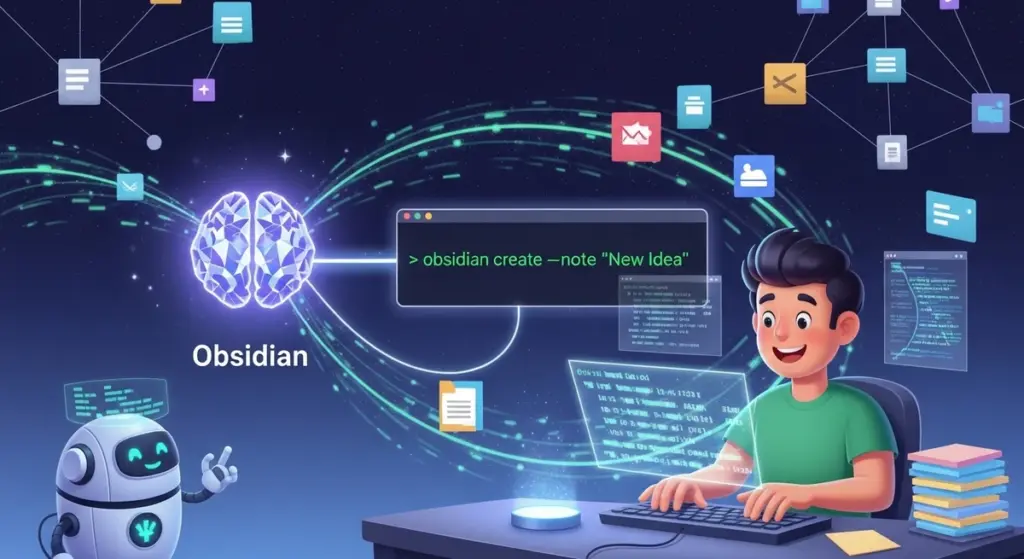
世界一やさしい!自分専用のObsidian CLIを自作して、魔法のようにノートを操る完全ガイドのPodcast
下記のPodcastは、Geminiで作成しました。
はじめに
個人の知識管理(PKM)において、Obsidianはもはや単なるノートアプリの枠を超え、思考を構造化するためのパーソナル・プラットフォームとしての地位を確立しました。多くのユーザーはグラフィカル・ユーザー・インターフェース(GUI)を通じて直感的にノートを操作していますが、真の生産性の極致は、ターミナルという「コマンドの魔法」を使いこなすコマンドライン・インターフェース(CLI)の世界にあります 。2026年に入り、Obsidianは公式にCLI機能を導入し、これまで一部のパワーユーザーのみが享受していた「自動化」と「スクリプトによる一括操作」が、すべてのユーザーに対して開かれようとしています。
本レポートでは、プログラミング初心者の方でも安心して取り組めるよう、自分専用のObsidian CLIツールを開発するための手順と、その背後にある技術的な仕組みを徹底的に解説します。既存のツールを単に使うだけでなく、なぜ自作が推奨されるのか、そしてNode.jsやPythonといったモダンな言語を用いて、どのように「人間に優しい」ツールを設計すべきかという深層的な知見を提供します。
知識管理におけるCLIの重要性と歴史的背景
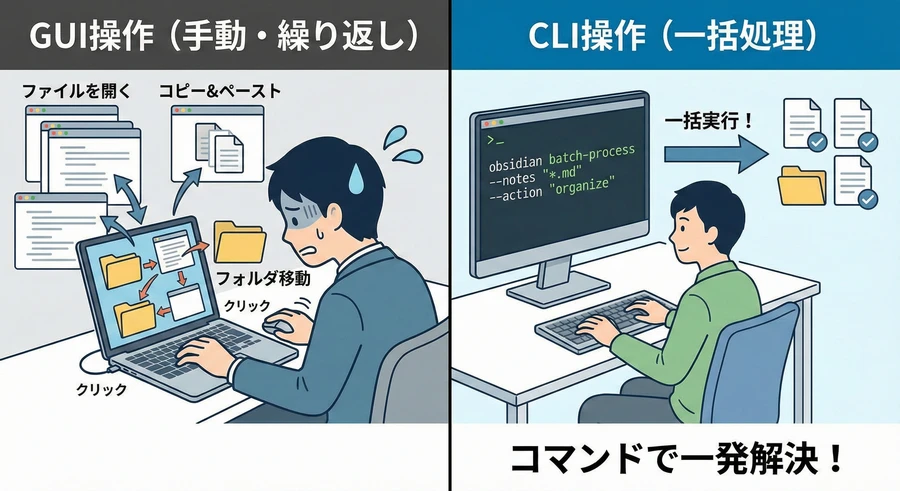
伝統的なUNIXの哲学において、ツールは「一つのことを上手に行い、かつ他のツールと連携できる」ことが理想とされてきました 。CLIはこの哲学を体現するものであり、ObsidianのようなローカルのMarkdownファイルをベースとしたアプリとは極めて相性が良いのが特徴です。GUIは「発見」や「直感的な配置」に優れていますが、CLIは「反復作業の自動化」や「大量のデータ処理」において無類の強さを発揮します。
例えば、数百件のノートに対して特定のタグを一斉に付与したり、毎朝特定のテンプレートからデイリーノートを生成し、その中に今日の天気を自動で書き込んだりといった作業は、CLIを用いることで一瞬で完了します。これは、GUIでマウスを何度もクリックする作業とは比較にならないほどの効率化をもたらします。また、CLIは「コンポーザブル(組み合わせ可能)」な特性を持っており、他のアプリやスクリプトとパイプ(|)で繋ぐことで、独自のワークフローを構築することが可能です 。
| インフェース比較 | GUI (デスクトップアプリ) | CLI (コマンドライン) |
| 主な対象者 | すべてのユーザー、初心者 | パワーユーザー、開発者 |
| 操作の性質 | 直感的、視覚的 | 論理的、命令的 |
| 得意な作業 | ノートの閲覧、図解、発見 | 自動化、一括変換、スクリプト実行 |
| 学習曲線 | 低い(すぐ使える) | 中〜高(コマンドの習得が必要) |
| 自動化の容易さ | 限定的(プラグイン依存) | 極めて高い(外部スクリプト連携) |
図1:GUIとCLIのワークフロー比較
コード スニペット
graph LR
    subgraph "GUI Workflow (Manual)"
    G1(Open App) --> G2(Find Note)
    G2 --> G3(Click Menu)
    G3 --> G4(Type Content)
    G4 --> G5(Repeat for each file)
    end

    subgraph "CLI Workflow (Automated)"
    C1(Terminal Command) --> C2{CLI Tool}
    C2 --> C3(Batch Processing)
    C3 --> C4(Vault Update)
    C4 --> C5(One-shot Completion)
    end
Obsidian CLI エコシステムの現状分析
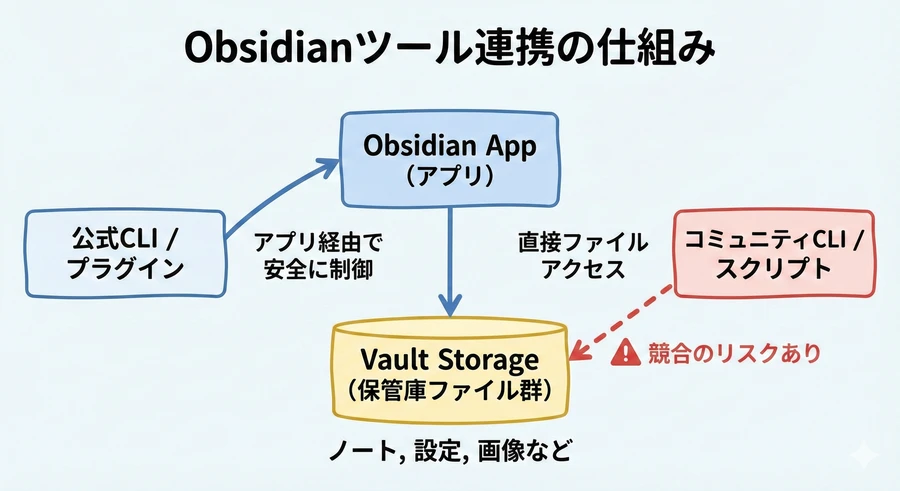
自分でツールを書き始める前に、現在どのような選択肢が存在するのかを把握することは極めて重要です。2026年現在のObsidian CLIエコシステムは、大きく分けて「公式CLI」「コミュニティ製ツール」「プラグインベースのAPI」の三層構造になっています。
図2:Obsidian CLI エコシステムの構造図
コード スニペット
architecture-diagram
    --> [Official CLI (v1.12+)]
    -->
    [Official CLI] -- IPC --> [Obsidian App]
    [Obsidian App] -- File System --> [Markdown Vault]
    -- Direct Access --> [Markdown Vault]
    -- REST API -->
    --> [Obsidian App]
公式 Obsidian CLI (v1.12以降)
Obsidian v1.12.0で導入された公式CLIは、アプリケーション本体と密接に連携した動作を特徴としています。これは、単にファイルを操作するだけでなく、実行中のObsidianアプリに対して「コマンドを実行せよ」という命令を送ることができるツールです。
- 主な機能: ノートの作成、検索、デイリーノートの展開、JavaScriptコードの評価(
dev:eval)など 。 - 動作要件: 実行時にObsidianアプリが起動している必要があります(起動していない場合は自動的にバックグラウンドで起動します) 。
- 特記事項: 現時点では早期アクセス(Catalystライセンス保持者向け)となっており、今後一般ユーザーにも無料で開放される予定です。
公式CLIの最も強力な点は、Obsidianの内部APIにアクセスできることです。これにより、通常はプラグインを作成しなければ実現できないような高度なデータ抽出や操作が、ターミナルから一行のコマンドで実行可能になります。
コミュニティ製ツール「NotesMD CLI」
かつて obsidian-cli と名乗っていたこのプロジェクトは、公式版との混同を避けるために notesmd-cli へと改称されました 。このツールはGo言語で書かれており、Obsidianアプリを起動させることなく、ハードディスク上のMarkdownファイルを直接高速に処理することに特化しています 。
- 強み: アプリ不要で動作するため、サーバー上の自動実行スクリプトや、軽量なターミナル環境での使用に最適です 。
- 機能: ファイルの移動に伴う内部リンクの自動更新など、Obsidianの挙動を模倣した高度なファイル操作をサポートします 。
CLI 開発のための言語選定:Node.js と Python
初心者がCLIを自作する場合、Node.js(JavaScript/TypeScript)かPythonのどちらかを選ぶのが一般的です。これらはライブラリが豊富で、ドキュメントも充実しているため、つまづきにくいという利点があります 。
Node.js を選ぶべき理由
Node.jsはJavaScriptで書かれているため、Obsidianのプラグイン開発と知識を共有できる点が大きな魅力です 。また、npm(Node Package Manager)を通じて提供されるCLI開発用フレームワークが非常に成熟しています 。
- Commander.js: コマンドの定義や引数の解析を簡単に行える、デファクトスタンダードなライブラリです 。
- Inquirer.js: 「どのテンプレートを使いますか?」といった、ユーザーとの対話形式(セレクトボックスやチェックボックス)のインターフェースを簡単に構築できます 。
Python を選ぶべき理由
Pythonは「読みやすさ」と「書きやすさ」において右に出るものはありません。特にデータ分析やAI連携を考えている場合、Pythonを選ぶことで将来的な拡張性が高まります 。
- Typer: Pythonの「型ヒント」を活用することで、最小限のコード量で洗練されたCLIを構築できます 。
- Rich: ターミナルの出力をカラフルにしたり、進捗バーを表示したりするのが非常に簡単です 。
自作 CLI の設計:人間に優しいインターフェース
「自分が使うだけのツールだから、適当でいい」と考えるのは禁物です。優れたCLIは、数ヶ月後の自分が使い方を忘れていても迷わずに使える「人間に優しい設計(Human-first design)」であるべきです 。
- 良い名前と明確なコマンド構造: ツールの名前は短く、打ちやすいものにします。コマンドは「動詞」から始める形式(例:
obsidian create)にすると直感的です 。 - 適切なフィードバックと静寂: CLIは「何も言わずに仕事を終える」ことが美徳とされる一方で、時間がかかる処理ではプログレスバーを表示するなど、ユーザーを不安にさせない工夫が重要です 。
- デフォルト値の活用: ボルトのパスを毎回入力させるのではなく、環境変数や設定ファイルからデフォルト値を読み込むようにします 。
初心者がハマる技術的障壁:macOS の NFD 問題
日本語環境でObsidian CLIを自作する際、ほぼ100%の確率で遭遇し、かつ最も解決が難しい問題が「macOSにおけるファイル名の正規化問題」です 。
図3:macOSにおける日本語ファイル名の正規化問題 (NFD vs NFC)
コード スニペット
graph TD
    subgraph "NFD (Normalization Form D)"
    A1 --> A2["'か' (base char)"]
    A1 --> A3["'゛' (combining mark)"]
    end

    subgraph "NFC (Normalization Form C)"
    B1["'が' (Python/Node string)"] --> B2["'が' (single composite char)"]
    end

    A1 -- "Matching Error!" --- B1
    B1 -- "unicodedata.normalize('NFC',...)" --> C1
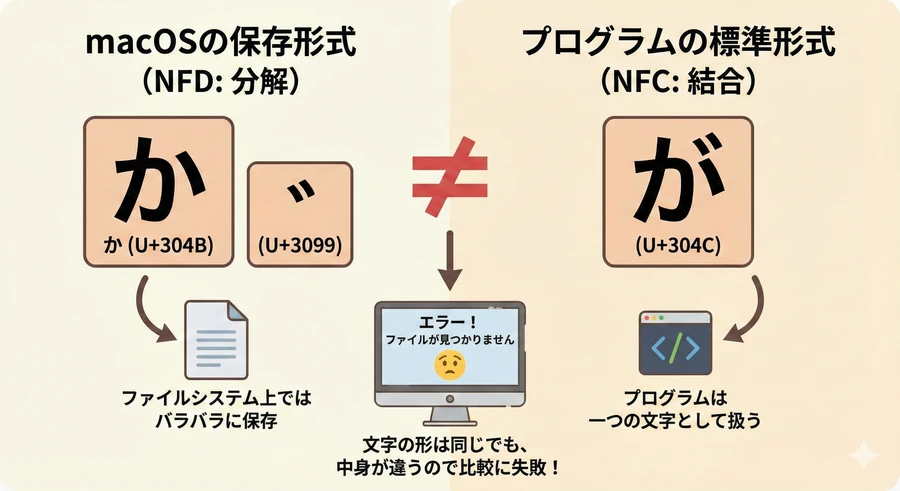
macOSのファイルシステム(APFS)は、ファイル名の「が」という文字を、二つのパーツに分けて保存する「NFD形式」を採用しています。一方、Pythonなどの言語が扱う文字列は一つのパーツとして扱う「NFC形式」が一般的です。この違いにより、ファイル名が一致せずエラーになる現象が発生します 。解決策として、Pythonでは unicodedata.normalize('NFC',...) を使用して、ファイルシステムから取得したパスを正規化することが必須です 。
AI エージェントを相棒にする開発手法
2026年現在の開発において、すべてのコードを自力で書く必要はありません。Claude CodeなどのAIツールは、Obsidianの内部構造やCLI開発のベストプラクティスを熟知しています 。
図4:AIを活用したCLI開発のライフサイクル
コード スニペット
flowchart TD
    P[User Prompt] --> A[AI Agent]
    A --> S
    S --> E
    E --> V{Check Results}
    V -- Failure/Error --> A
    V -- Success --> D
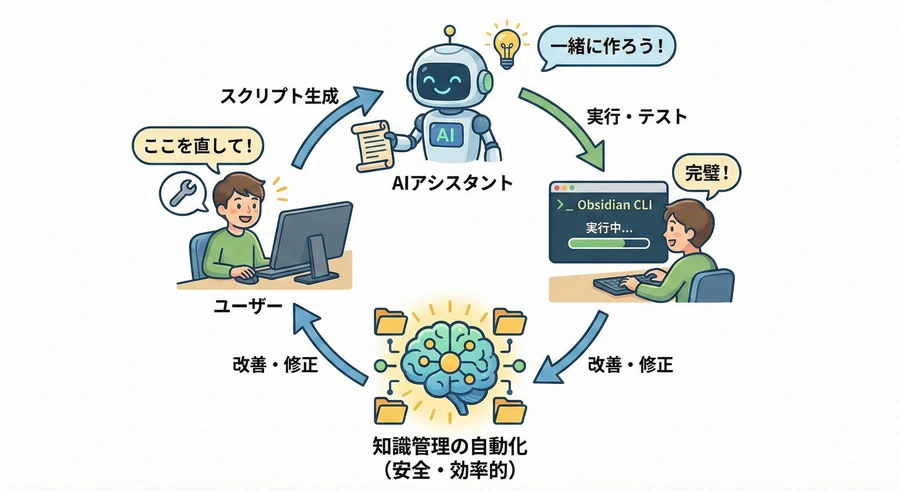
AIに「昨日のデイリーノートの未完了タスクを今日に転記するスクリプトを作成して」と依頼し、生成されたコードを自分の環境に合わせて微調整するプロセスを通じて、開発スキルとObsidianへの理解を同時に深めることができます。
運用上の注意点とトラブルシューティング
開発したCLIを安全に運用するために、いくつかの重要な注意点があります。
- 設定ファイルの一括編集に関する警告: Obsidianのプラグイン設定(
data.json)を書き換える場合、必ずアプリを完全に終了させてから実行してください。起動中に書き換えても、アプリ終了時に古い設定で上書きされてしまうためです 。 - サイレント・フェイailureへの対策: 公式CLIの一部では、エラーが発生しても終了コードが正常(0)として返されるケースがあります。出力されるテキストに "Error" が含まれていないかをチェックする処理を設けるのが安全です 。
- バックアップの徹底: CLIによる一括操作はリスクを伴います。実行前には必ずボルト全体のバックアップを取る習慣をつけましょう 。
結論:ターミナルから広がる無限の思考空間
Obsidian CLIの自作は、自分の思考と記録のプロセスを「自分の手に取り戻す」行為です。最初はたった数行のスクリプトから始めて構いません。ターミナルを開き、コマンドを打ち込み、Obsidianがそれに応える。その瞬間、あなたのノートは静的なテキストファイルから、動的に変化し続ける「生きた知識のネットワーク」へと進化するのです。
参考資料
- Yakitrak/obsidian-cli: CLI tool for interacting with Obsidian vaults,(https://pkg.go.dev/github.com/Yakitrak/obsidian-cli)
- heyitsnoah/obsidian-tools: Automate Obsidian workflows including email and summaries, https://github.com/heyitsnoah/obsidian-tools
- Bip901/obsidian-cli: Python based CLI to interact with Obsidian,(https://github.com/Bip901/obsidian-cli)
- Yakitrak/notesmd-cli: Renamed from obsidian-cli to avoid confusion with official CLI,(https://github.com/Yakitrak/obsidian-cli)
- Node.js vs Python: Comparison for web and CLI development in 2025, https://mobilunity.com/blog/node-js-vs-python/
- Node.js vs Python for backend development in 2025, https://powergatesoftware.com/tech-blog/node-js-vs-python-for-web-development/
- Best Node.js CLI frameworks comparison 2025, https://kanhasoft.com/blog/node-js-vs-python-which-is-best-for-backend-development-in-2025/
- Comprehensive Comparison of Node.js and Python for 2025, https://www.slincom.com/blog/programming/nodejs-vs-python-comprehensive-comparison
- Backend development trends for 2025: Node, Python, Go, and Java, https://talent500.com/blog/backend-2025-nodejs-python-go-java-comparison/
- Commander vs Inquirer vs Typer for CLI development, https://npm-compare.com/commander,enquirer,inquirer,prompts,vorpal,yargs
- CLI Automation Guide 2026: Node.js, Python, and Go compared, https://zenn.dev/gaku1234/articles/cli-automation-guide-2026-introduction?locale=en
- Building CLI applications made easy with Node.js frameworks, https://ibrahim-haouari.medium.com/building-cli-applications-made-easy-with-these-nodejs-frameworks-2c06d1ff7a51
- Node CLI with Commander and Inquirer tutorials, https://korzio.medium.com/node-cli-with-commander-and-inquirer-3eacc0086e7c
- Best of JS: Trending CLI projects and libraries, https://bestofjs.org/projects?page=1&limit=30&tags=cli&sort=total
- Turning an Obsidian vault into a searchable wiki with MongoDB, https://medium.com/mongodb/i-turned-my-obsidian-vault-into-a-searchable-wiki-e292dd3c44da
- Technical specifications of Obsidian vault structures, https://bryanhogan.com/blog/obsidian-vault
- Claude Code and Obsidian vault organization techniques, https://zenn.dev/shimo4228/articles/claude-code-obsidian-vault-organization?locale=en
- Reddit discussion on Obsidian folder structures,(https://www.reddit.com/r/ObsidianMD/comments/1o8ls53/what_folder_structure_do_you_use/)
- Python script for adding heading properties to Obsidian frontmatter, https://github.com/ggfevans/frontmatter-add-heading-property
- Obsidian Local REST API plugin documentation, https://github.com/coddingtonbear/obsidian-local-rest-api
- Obsidian URI: Official documentation for custom protocols, https://help.obsidian.md/uri
- Obsidian Local REST API features and usage, https://www.obsidianstats.com/plugins/obsidian-local-rest-api
- Obsidian 1.12.0 Early Access release discussion on Reddit,(https://www.reddit.com/r/ObsidianMD/comments/1r13dy8/obsidian_1120_early_access_is_now_available_to/)
- Interacting with Obsidian API from terminal: Community methods,(https://www.reddit.com/r/ObsidianMD/comments/1o2zwsm/is_it_possible_to_interact_with_obsidian_api_from/)
- Catchy title trends for developer articles, https://hackernoon.com/how-to-clickbait-a-developer-105-catchy-title-trends-dx1034fo
- CLI project ideas and inspirations, https://dev.to/blxssomxyz/cli-project-ideas-2fp5
- Command Line Interface Guidelines (clig.dev), https://clig.dev/
- Designing a delightful command line interface: Principles and styles, https://developerrelations.com/talks/designing-a-delightful-command-line-interface/
- Obsidian 1.12.0 Desktop Release Notes, https://obsidian.md/changelog/2026-02-10-desktop-v1.12.0/
- Obsidian CLI help documentation, https://help.obsidian.md/cli
- Official Obsidian Changelog archive, https://obsidian.md/changelog/
- Obsidian Roadmap and feature launch history, https://obsidian.md/roadmap/
- Reddit: Obsidian 1.12.2 Early Access updates and CLI fixes,(https://www.reddit.com/r/ObsidianMD/comments/1r8hvdo/obsidian_1122_early_access_for_desktop_and_mobile/)
- Obsidian 1.12.0 Early Access: Catalyst license and Discord setup,(https://www.reddit.com/r/ObsidianMD/comments/1r13dy8/obsidian_1120_early_access_is_now_available_to/)
- Obsidian CLI 1.12 silent failures and workarounds for AI agents,(https://www.reddit.com/r/ObsidianMD/comments/1r3ljxz/obsidian_cli_112_has_13_silent_failures_i_made_an/)
- Obsidian Forum: CLI and Web Clipper issues on Windows, https://forum.obsidian.md/t/obsidian-open-and-web-clipper-works-only-when-obsidian-is-closed-no-response-when-obsidian-is-already-running-windows/111129/7
- Obsidian Forum: CLI registration issues on macOS, https://forum.obsidian.md/t/cli-stops-working-after-obsidian-quit-relaunch-on-macos-requires-re-registration/111419
- Obsidian CLI Setup Guide: Windows and macOS specifics, https://zenn.dev/sora_biz/articles/obsidian-cli-setup-guide?locale=en
- System eval with Obsidian and Claude Code, https://interjectedfuture.com/system-eval-with-obsidian-and-claude-code/
- Obsidian CLI: Challenges and custom script examples,(https://www.reddit.com/r/ObsidianMD/comments/1r1g5pw/give_me_your_challenge_lets_see_if_the_new_cli/)
- Commander.js explained: Scaling Node.js CLI tools, https://betterstack.com/community/guides/scaling-nodejs/commander-explained/
- Inquirer.js official documentation and prompt types, https://github.com/sboudrias/inquirer.js/
- How to test Inquirer prompts in Commander.js actions, https://stackoverflow.com/questions/79613041/how-can-i-test-inquirer-prompts-in-commander-js-action
- How to prototype a CLI using Commander and Inquirer in less than 3 hours, https://medium.com/swlh/how-to-prototype-a-cli-using-commanderjs-and-inquirerjs-in-less-than-3-hours-6d5f0d1b9725
- YouTube tutorial: Interactive Node.js CLI with Inquirer,(https://www.youtube.com/watch?v=8hbOlxGlWI8)
- Python CLI: Click vs Typer tutorial for beginners 2025, https://oneuptime.com/blog/post/2025-07-02-python-cli-click-typer/view
- Typer first steps and official tutorial, https://typer.tiangolo.com/tutorial/first-steps/
- Python Typer module: Installation and basic usage, https://www.geeksforgeeks.org/python/python-typer-module/
- Obsidian 記事骨子作成とGemini CLI連携のチュートリアル, https://qiita.com/mare13137/items/7ed5e7d9fabe5c24695e
- Obsidianのインストールと日本語化手順の完全版, https://note.com/csfive/n/n0f767f7bae73
- Obsidian インターフェースの言語設定と多言語サポート,(https://publish.obsidian.md/help-ja/%E3%82%B3%E3%83%B3%E3%82%BB%E3%83%97%E3%83%88/%E3%82%A4%E3%83%B3%E3%82%BF%E3%83%BC%E3%83%95%E3%82%A7%E3%83%BC%E3%82%B9%E3%81%AE%E8%A8%80%E8%AA%9E)

コメント